09 Jan'26





Full and accurate descriptions play an important role in online sales. A lot of the time, shoppers learn the most about your product from the Etsy description. It is also one of the most important components to increase your search engine ranking.
A description is required to publish a listing on Etsy. In Salestio, you can add this through Description Templates in Selling List settings. Keep reading to learn more about creating and using Description Templates.
Salestio offers flexible tools to tune the Etsy descriptions and make them fit your marketing strategy. In this article, we will explore the possibilities of Etsy Description Profiles in Salestio.
For a general guide on listing products, check the article below:
List on Etsy: create new listings from Shopify products
Managing Description Templates
To see the current templates and add new ones, go to Salestio > Etsy > Profiles > Description Templates. Click “Add Description Template” to start editing.
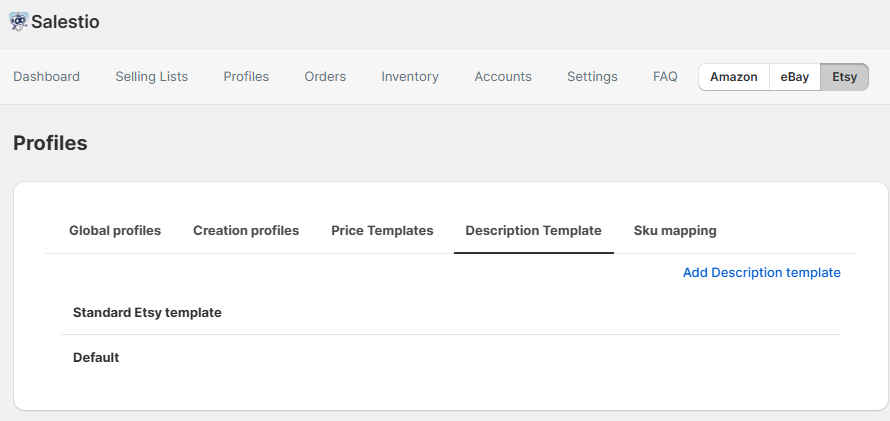
In each template, add a Name (as it will be represented inside Salestio) and the Description body in the editor below. In the body section, you can add custom text or variables from the store.
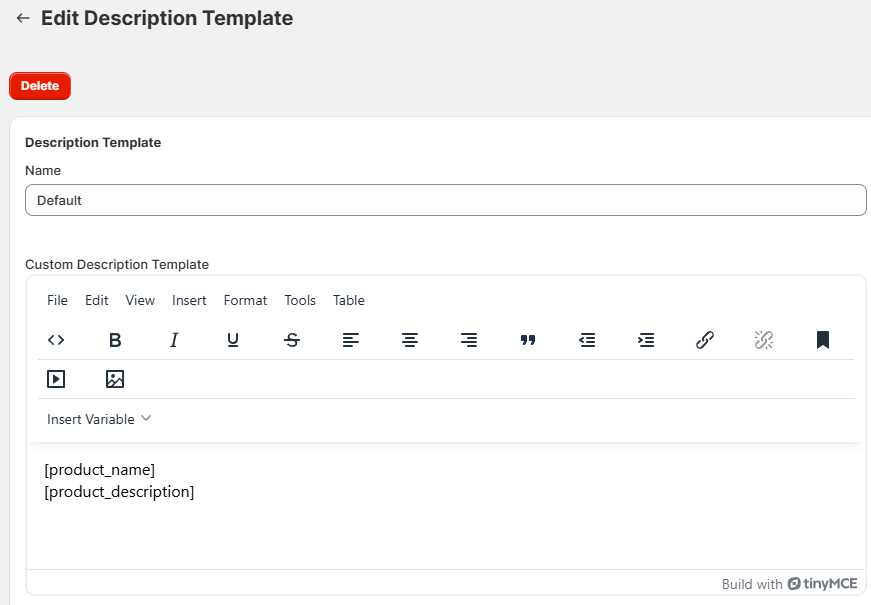
Below are the available tools for Etsy descriptions:
- Plain text. Adding text directly will make it appear on all listings using this template.
- Store data such as titles, product SKU, original description, etc.
- Custom fields (BigCommerce, Shopware) and Shopify Metafields.
To add a custom field or variable, click “Insert Variable” in the editor and pick it from the list. When a variable is added, Salestio will fetch the information from the corresponding product page.
Etsy does not support pictures in the description section. If you want to include some extra pictures for the Etsy listings (e.g., a size chart), add them to the product page in the store.
Since HTML is not allowed, Etsy does not accept text formatting with color, fonts, or layout markup. If you would like to structure the text in the description, use short paragraphs or line breaks.
If you are selling on eBay and want to expand descriptions with CSS, pictures, and more, check the guide below.
eBay Description Templates: Make Beautiful Descriptions Faster
Applying the templates
To use one of the saved Description Templates, edit the Selling list settings:
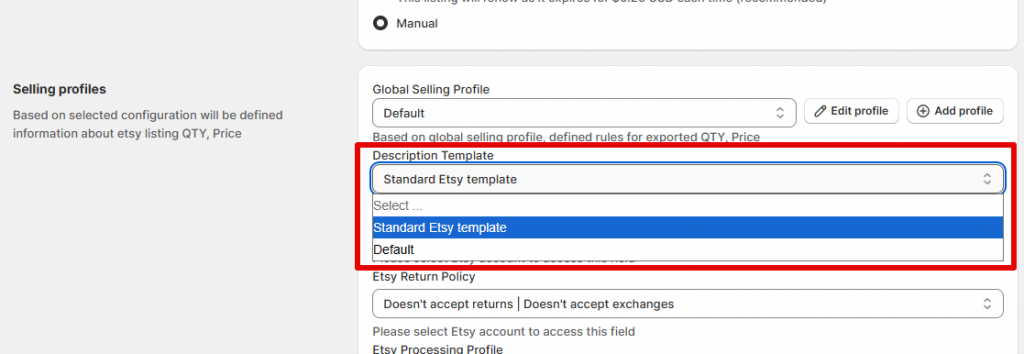
Salestio will apply the new description in the following cases:
- Listing new products on Etsy (Send to Etsy action)
- Manually updating existing products (Update action)
Example templates
The default template contains just the original product description from the store and looks like this:
[product_description]You can extend your template with a short promotional section to announce a sale or other events. Include the [product_title] variable to personalise it for each product:
Upgrade your everyday experience with [product_title] — designed to deliver quality, convenience, and value you can rely on. For a short time only, enjoy 20% off and free shipping.
[product_description]
If your Etsy description is completely different from the store item pages, you can store it in a custom field. Below is an example that uses multiple Shopify metafields to compose a description:
Materials: [metafield('Product', 'custom:material')]
Color: [metafield('Product', 'custom:color')]
[metafield('Product', 'custom:etsy_description')]
Related: Generate Product Titles and Descriptions with AI tools
Adding customized descriptions is helpful for adapting product pages to the marketplace and increasing sales. Salestio streamlines this customization with Description Templates. Check if the app is available for your e-commerce platform and get a Free 30-Day Trial.