Integrate active Amazon listings into your Shopify store with Autopilot
 Play video
Linking listings one at a time suits a few dozen products and breaks down at a few thousand. Autopilot handles the second case. It reads the active inventory on your Seller Central account and matches it against your Shopify catalogue during onboarding.
The video covers what Autopilot matches on its own and what it leaves for you to review, since no automatic matcher can resolve products whose identifiers differ.
What you will learn
- How Autopilot imports active Amazon listings during onboarding.
- How Seller Central inventory is matched to Shopify products.
- Which cases still need a manual decision, and why.
- How to move a large existing Amazon catalogue onto store-driven sync safely.
Steps shown in the video
- Connect the Amazon account and start the onboarding sync.
- Let Autopilot read the active listings from Seller Central.
- Review the products it has matched to Shopify items.
- Resolve the remainder manually where identifiers do not line up.
- Enable synchronisation so Shopify drives quantity and price on the linked listings.

Watch next
 0:53
0:53
How to add an Amazon account to Salestio
The complete account authorisation flow in under a minute, from the Salestio accounts screen to an approved Amazon connection.
 1:14
1:14
Adding an Amazon account: Shopify Amazon integration manual
The account setup manual, including the prerequisite that catches merchants out: Amazon integration needs a Professional seller account.
 0:59
0:59
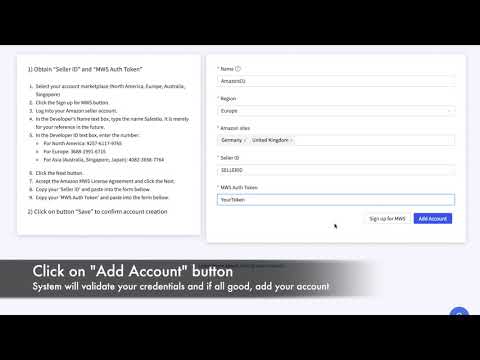
Adding an Amazon account on BigCommerce
The same authorisation flow seen from a BigCommerce store, for merchants who want to check the BigCommerce screens before starting.
Connect Amazon to your store
Start a free trial, authorise your seller account and link your first listings, following these videos on your own catalogue.
Where to go next
Prefer to watch on YouTube? Subscribe to the Salestio channel for new tutorials. youtube.com/c/salestio