



What connecting Amazon involves
Authorising Amazon takes about a minute. You approve Salestio in Seller Central and the account appears in the app. The work that follows is catalogue work, and it splits into two situations that these videos treat separately.
Sellers who already list on Amazon should start with linking. Every existing ASIN needs to be matched to the right product in your store so that stock and price sync to the listing instead of creating a second one. Sellers starting fresh should start with creation: filling the attributes Amazon requires for your category and exporting products as new listings.
Linking protects your listing history, your reviews and your Buy Box position. Skipping it creates duplicate ASINs, which take time to unwind.
- Authorise an Amazon seller account and choose which regional marketplaces to sell in.
- Match existing Amazon listings to store products by SKU or ASIN.
- Pull active Seller Central inventory into the store so one system drives stock.
- Decide per-product price and quantity rules before anything goes live.
Who these videos are for
Merchants who already sell on Amazon and want their store to hold the master stock and price, and merchants preparing a first Amazon launch who want to see the account setup before they start.
Amazon applies stricter product data rules than eBay or Etsy. GTIN requirements, category attributes and listing eligibility all apply before a product goes live. The product overview videos give the wider context if you are still deciding whether that effort pays off.
One account or several
Salestio supports several Amazon accounts and several regional marketplaces on one installation, which matters if you sell in both North America and Europe or run separate brands. You authorise each account the same way, and each connected marketplace keeps its own listings, prices and inventory rules.
The account videos below use one account for clarity. Adding a second follows the same steps.
Amazon walkthroughs
From authorising the account to bringing an existing Amazon catalogue under control.
 0:53
0:53
How to add an Amazon account to Salestio
The complete account authorisation flow in under a minute, from the Salestio accounts screen to an approved Amazon connection.
 1:14
1:14
Adding an Amazon account: Shopify Amazon integration manual
The account setup manual, including the prerequisite that catches merchants out: Amazon integration needs a Professional seller account.
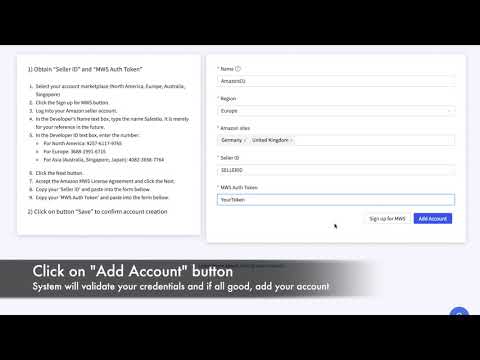 0:59
0:59
Adding an Amazon account on BigCommerce
The same authorisation flow seen from a BigCommerce store, for merchants who want to check the BigCommerce screens before starting.
 3:37
3:37
Connect Shopify products to existing Amazon listings
How to match products you already sell on Amazon to the matching Shopify products, so stock and price sync without creating duplicate ASINs.
 4:00
4:00
Import active Amazon listings into Shopify with Autopilot
Autopilot pulls your existing Seller Central inventory into Salestio and matches it to Shopify products, so a large Amazon catalogue comes under store control without manual linking.
Related videos from other topics
These walkthroughs live under another topic but cover the same ground.
 3:52
3:52
Salestio for Ecwid: sell on Amazon, eBay and Etsy
How Ecwid merchants export products to Amazon, eBay and Etsy, import marketplace orders back, and keep inventory aligned across every channel.
 7:55
7:55
Integrating WooCommerce with Amazon: full app overview
Installation, configuration, product export and order management for WooCommerce stores selling on Amazon. The longest and most complete overview in the library.
 8:13
8:13
Part 9: creating Amazon variations with Salestio
A detailed look at the creation profile, the object that decides how Shopify product data becomes a compliant Amazon variation listing.
 7:22
7:22
Part 8: Salestio app overview for multichannel selling
The turning point of the series: how one app connects the Shopify store to Amazon and eBay, and how Printify fulfils marketplace orders automatically.
 7:47
7:47
Part 7: creating variation products directly on Amazon
How Amazon models a size-and-colour product: parent and child ASINs, variation themes, and the attributes apparel listings require.
 6:47
6:47
Part 6: Amazon registration and GTIN exemption
The step that blocks most print-on-demand sellers. Amazon wants a barcode for every product, and custom-printed items have none. Here is the exemption process.



Frequently asked questions
Connect Amazon to your store
Start a free trial, authorise your seller account and link your first listings, following these videos on your own catalogue.
Where to go next
Prefer to watch on YouTube? Subscribe to the Salestio channel for new tutorials. youtube.com/c/salestio