13 Mar'26




Salestio Multi-Store Sync is a helpful tool for maintainers of multiple Shopify stores. The app updates prices and quantities as they change over time, and syncs product information across the stores. In this article, we will explore the possible options and customizations when setting up the Dependent store side of the app.
For a general overview to get started with Multi-Store Sync, check the guide below:
Multi‑store Sync from Salestio — connect multiple Shopify stores
Click the Settings button from the Dashboard to change preferences in the Dependent store to adjust the preferences:

Product data Synchronization Preferences
The owner of the Dependent store can select what product data will be synced from the Dependent store.
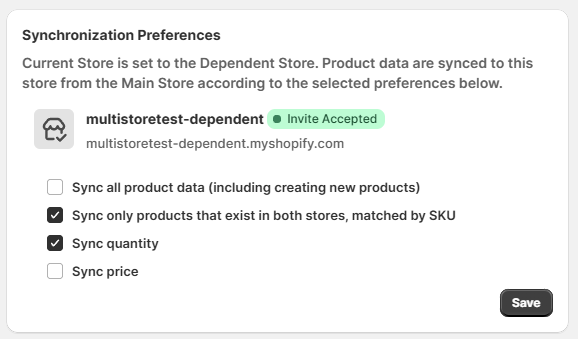
- Sync all product data: enabling this option will update all possible information in the Dependent store. This includes product details (descriptions, titles), prices, quantities, and new products. For example, if a new product appears in the Main store, the app will create it in the Dependent store with this option enabled.
- Sync only products that exist in both stores: Multi-Store Sync scans the stores to find product matches (pairs are found by SKU). With this option enabled, product matches will be linked across the stores. When titles or descriptions are updated in the Main store, the changes will be synced to the Dependent store.
- Sync quantity / Sync price: Both options are available only when syncing existing products. Select if you want to receive regular price or quantity updates from the Main store.
To set up a two-way sync between stores, see the guide below:
Sync inventory back to the Main Store — Multi-Store Sync
Location Settings
In this section, map the Main store Shopify Locations to the Dependent store Locations. The selection here is up to you and provides options to organize the inventory across the different shops.
When the mapping is empty, Multi-Store Sync will use the Default Location in each store for updates.
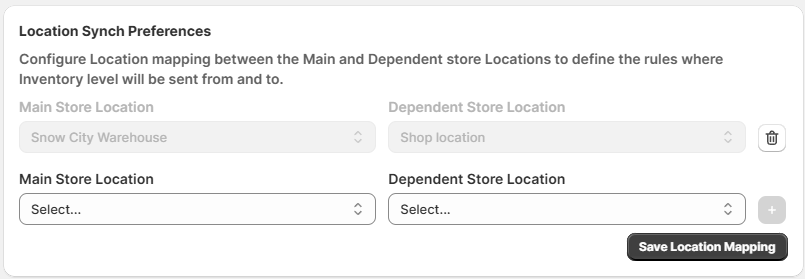
In the example above, our Main store has a dedicated Shopify Location called “Snow City Warehouse” to reflect the inventory of the Dependent store. Mapping it to “Shop location” in the Dependent store will keep the inventory management organized for easier navigation.
You can map as many Locations as the Main store has. Click the plus icon to add the Location pairs, and remember to save the mapping when done.
When pairing Multi-Store Sync with Salestio for linking with online marketplaces, remember to adjust the Location preferences accordingly. See the guide for Salestio users below:
Shopify Locations in Salestio
Catalog Preferences
In the Catalog Synchronization section, you can limit which products the app updates. The default is All products.

To limit the product selection for the app, switch to Collections mode. Pick the Shopify Collections from the Main store in this list, and Multi-Store Sync will ignore the rest of the items.
For example, our main store in Paris has the complete product line, including paints, brushes/rollers, sprayers, and adhesives. All product groups are sorted into a separate Shopify Collection. The smaller shop in Reims stocks only paints and adhesives, so we select the corresponding Collections in this section. This way, the Dependent store in Reims can enjoy automatic inventory sync to the main location without cluttering the Shopify admin with extra items.
Get Salestio — Multi‑store Sync from the Shopify App Store. See the docs pages for guides and details. If you have any questions about the app, feel free to reach out to our support team at support@salest.io.