09 Oct'26




eBay has introduced standard sizes for its apparel/footwear categories, and it might mean that your listings need an update. In this article, we explain the changes and the related settings in Salestio.
The changes affect all eBay listings in Clothing/Apparel and Footwear categories. eBay is adding these changes in an effort to make the catalog more searchable and increase confidence for shoppers.
What are the new requirements?
eBay will now use a defined set of size values for Fashion listings. After the change, using non-standard values may get the listing rejected by eBay. The standard sizes depend on each category and marketplace.
You can check the exact expected values when setting up the category information in Salestio. Click the Size field to see the available options in the dropdown.
For eBay US, the accepted sizes also depend on the selected Size Type.
For some sizes that can be confidently identified, eBay will automatically convert the variations. Keep in mind that this will happen only for easy-to-recognize, unambiguous size labels. For example:
- “Small” > “S”
- “Medium” > “M”
Ambiguous values such as One-size or N/A will prevent the listings from publishing. In this case, you should indicate the closest matching standardized size.
Adjust size options in Salestio
When setting up the category information in Salestio, you can add a variation mapping to automatically convert the sizes. In Creation Profile or Listing Data, expand the Variation Mapping section to add your own pairs:
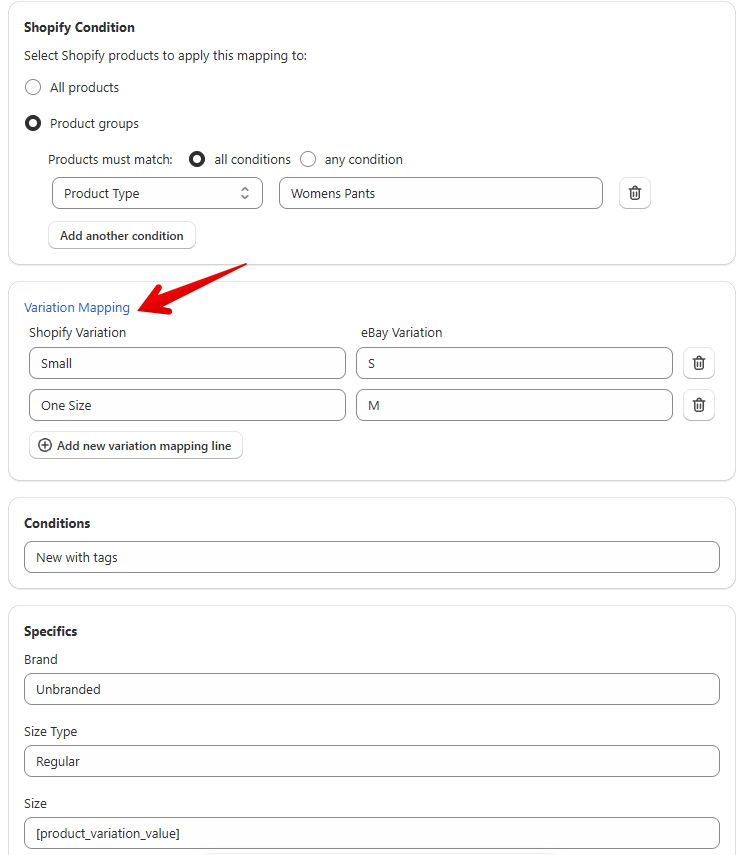
If you are adding multiple eBay categories to your Creation Profile, make sure to set up a Variation Mapping for each of them.
With Variation Mapping configured, Salestio will automatically replace the variation names during listing creation.
See the full guide for listing products: Exporting Shopify Products to eBay Marketplace with Salestio
Dealing with non-conforming sizes
In some cases, you might run into some sizes that cannot be fully represented through the standard options on eBay. Notably, the tagged size might be misleading in the following situations:
- One Size
- Vintage/Pre-Owned
- Tailored items
There are different ways to fully describe items like this. eBay recommends the following:
- Indicate the closest standard size that fits the item.
- Add the original size tag to the description.
- Provide the size grid from the manufacturer.
- Measure the item on your own and add the details to the description.
Edit eBay descriptions in Salestio
To extend your eBay descriptions with more size information, edit your Description Template in Salestio > Profiles. Using the editor, you can add measurements from a metafield, include a size grid picture, or add other details about the sizing.
Learn more: eBay Description Templates

Related errors
"example" is not a valid value for Size. Select a value from the available options.This error appears when sending non-standardized size variations. To resolve this, make sure that the Variation Mapping includes the variation mentioned in the error message. After adjusting the mapping, send the item again.
"X" is not a valid Size Type for the Size "Y". Select a compatible Size Type and Size combination.The above error can appear in some categories that have a Size Type. For instance, sending XLT size with a Regular size type will throw this error. The correct size type in this situation would be “Big&Tall”. To fix this, edit the Creation profile or Listing Data to feature the right type for your size, then send the product again.
Best practices
- Stick to using standardized size names in your e-commerce store.
- Configure Variation Mappings for sizes that need them.
- Check Size Type where applicable.
- Add extra sizing details to the product description.
If you want to start selling on eBay, Salestio can help by automating the process. Don’t have the app yet? Grab a Free 14-day Trial here.
For any questions and comments regarding Salestio, feel free to message support@salest.io.