25 Sep'26





The Salestio team is always working on improving the app. Let’s review the latest feature updates and news with Salestio for the third quarter.
If you want to see any specific features in Salestio, feel free to share your ideas with us: support@salest.io. Check out the roadmap to vote on interesting ideas and add your own.
Check out the recent Salestio webinar: Quantity Sync Rules in Salestio. This time, we are going through the flexible configuration options for sending the stock level from your store to Amazon, eBay, or Etsy:
- Default configuration for quantity sync
- Item QTY Modes
- Locations settings
- Troubleshooting quantity synchronization
Subscribe to the Salestio YouTube channel to catch future discussions and ask questions live!
Salestio for all platforms
Open Beta for the Kaufland integration
The team is actively working on bringing full feature support for Kaufland sellers. Right now, order synchronization is already available for all Salestio users (Shopify, Shopware, BigCommerce, WooCommerce, Ecwid.) This includes:
- Importing Kaufland orders to the e-commerce store.
- Sending tracking information from the store to Kaufland.
- Updating the Kaufland order status.
Check out the documentation article for help with connecting your seller account to Salestio.
Feel free to try out the Kaufland features and share your feedback with the team!
Walmart support
The Walmart part of Salestio is out of beta and now available for all users. The integration received stability improvements, email notification support, and is now featured on the onboarding flow. The next steps are product listing and synchronizing the inventory. Stay tuned for future updates!
Email notifications for delayed fulfillment
In addition to other notification types, Salestio can now give you a heads-up if any orders are taking too long to fulfill. Adjust this setting along with other notifications in Salestio > Settings tab. You can indicate the acceptable fulfillment delay to get notified only about the orders that need attention.

Expanded support for custom Etsy properties
Recently, Etsy introduced the option to use custom names for the variation properties. Salestio can now utilize the custom field by using the exact variation theme name from your store. For example, if your store item product has variation in “Fragrance” and it’s not available on Etsy. In this case, map a “Custom Property” to the “Fragrance” option. Add these changes in your Creation Profile > Variation Data:

Extended conditions for collectibles on eBay
Recently, eBay has made specifying the unique condition properties mandatory for multiple coin and trading card categories.
This information can now be specified in Salestio through the mapping in the Creation Profile or through the Listing Data:

Learn more in our detailed guides for Collectable Coins and Trading Cards
Variation Mappings for eBay
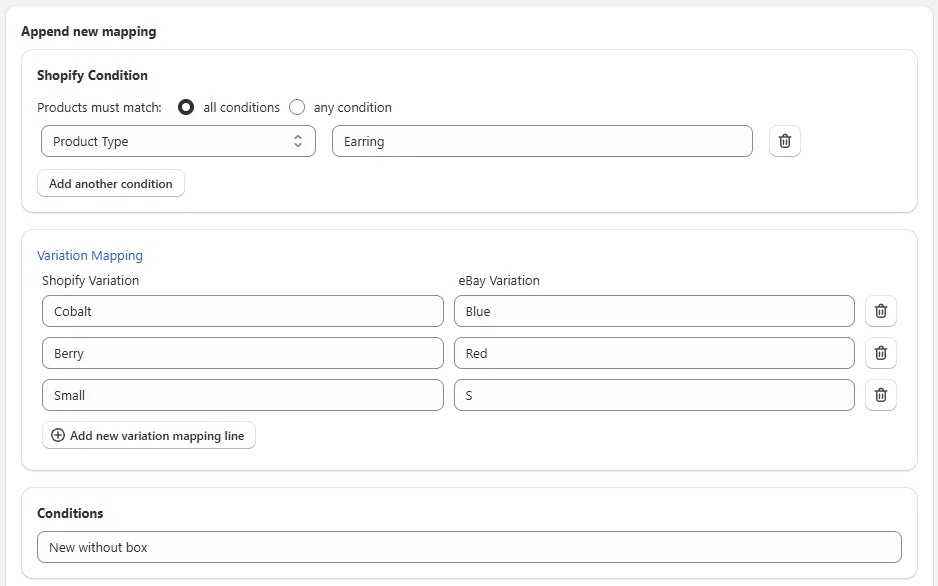
To help users stick to the standard variation names, Creation Profiles now feature Variation Mappings. For example, a “Small” apparel variant should use “S” instead, so you can add this pair to your mapping.
To map a variation in the Creation Profile or Listing Data, type its store name and the desired eBay name:
Shopify app
Critical Events board
A new section has been added to the Salestio Dashboard for Shopify users. If you have any critical issues, they will appear as a notification at the top. For example, if any orders fail to import or a listing update results in an error, they will show up here.
Alerts for ongoing issues will appear in the Critical Events section, and Salestio will automatically remove them as they are resolved.

Automatic sync for metafield modes
Metafield modes for Price and Quantity in the Global Profile have got an update. Now the metafield modes support automatic updates.
- Salestio scans the store for metafield changes every 4 hours.
- If metafields assigned to price and/or quantity are changed, the Selling List automatically sends an update to the marketplace.
To switch to this mode, go to Salestio > Profiles > Global Profiles and pick your profile from the list. Switch the “Item QTY/Price Mode” options to Metafields and assign your Shopify Metafield below:

Other improvements
- Support for partial refunds from Etsy into Shopify.
- More detailed logs for the Selling Products view. Most logs are stored for longer (1 month,) and the last error message is stored indefinitely.
- Option to manually edit order addresses inside Salestio, with more customization coming soon.
Learn more: Edit Shipping Address on Salestio Orders - SKU search in the “Amazon log details” section.
- Inactive Amazon listings can now be linked through the Inventory tab.
- Option to use Buffer QTY combined with Not more than for Item QTY mode.
PrestaShop eBay module
PrestaBay received incremental updates, as well as new features:
- Compatibility with PrestaShop 9.1.5.
- Stop disabled products on eBay regardless of quantity.
- Do not relist/list disabled products in PrestaShop.
- Optimized UI for access by multiple employees.
- Raised the number of Custom Item Specifics to 20.
Upcoming integrations
Check the links below to get notified when Salestio supports more platforms:
If you are new to Salestio, check out the FAQ pages for Amazon, eBay, and Etsy integrations. See if the app is available for your store and get a Free 14-day Trial.