10 Jul'26





Sellers of collector’s items on eBay know that the marketplace features a detailed system of conditions for such categories. eBay has made specifying the unique condition properties mandatory, so sellers have to provide additional information about the state of the item. In Salestio, you can adjust these details using Condition Descriptors.
In this article, we will go over the affected card categories and their configuration specifics.
Set up the products for listing
The basic setup is the same as for any other eBay listings. Let’s go over the key steps depending on your listing mode of choice: Selling List view or Selling Products view.
Configure a Selling List
As with other eBay categories, Salestio needs a set of profiles for publishing marketplace listings. Below is the checklist of key steps in Salestio to set up a Selling List:
- Set up a Creation Profile
In this profile, you can map Shopify product groups to eBay categories. Condition Descriptors for cards are also added here. - Add an eBay Profile
Add auction settings, delivery details, and other eBay-related settings here. - Add items to a Selling List and send
Selling Lists hold your listings, and you can manage them through here.
See the detailed guide on publishing eBay listings for more related customizations and settings.
Configure listings in Selling Products view
Follow the steps below to publish an item through Selling Products view:
- Add the item to your product list
- Add Listing Data using the pen icon
Listing Data encompasses product details, such as auction settings, eBay category, and Business Policy configuration. This section includes the Condition Descriptors when listing cards. Optionally, you can save this Listing Data for future items and find it on the Syncing Rules page later. - Send the item to eBay
Select the product in the list and run the Send to eBay action to publish the item on the marketplace.
See the detailed guide below for more tips and customization options
Selling Products view: manage products in Salestio
Add Condition Descriptors for Cards
eBay requires an accurate condition indicator when publishing single cards. The following categories are affected:
- Toys & Hobbies > Collectible Card Games > CCG Individual Cards
- Sports Mem, Cards & Fan Shop > Sports Trading Cards > Trading Card Singles
- Collectibles > Non-Sport Trading Cards > Trading Card Singles
When setting up your product details for Ungraded cards, make sure to stick to eBay card condition guidelines. 4 possible states are available for each category:
- Near mint or better: cards equivalent to a fresh pack, with slight imperfections allowed.
- Excellent (Lightly Played): clearly visible signs of wear on the low side.
- Very good (Moderately Played): cards with moderate to heavy damage, such as discoloration or creases.
- Poor (Heavily Played): major damage in the form of missing corners, big scratches, and creases.
Condition details can be added alongside the other product specifics when adding a mapping in the Creation Profile. The Card Condition field appears when setting the card as Ungraded:
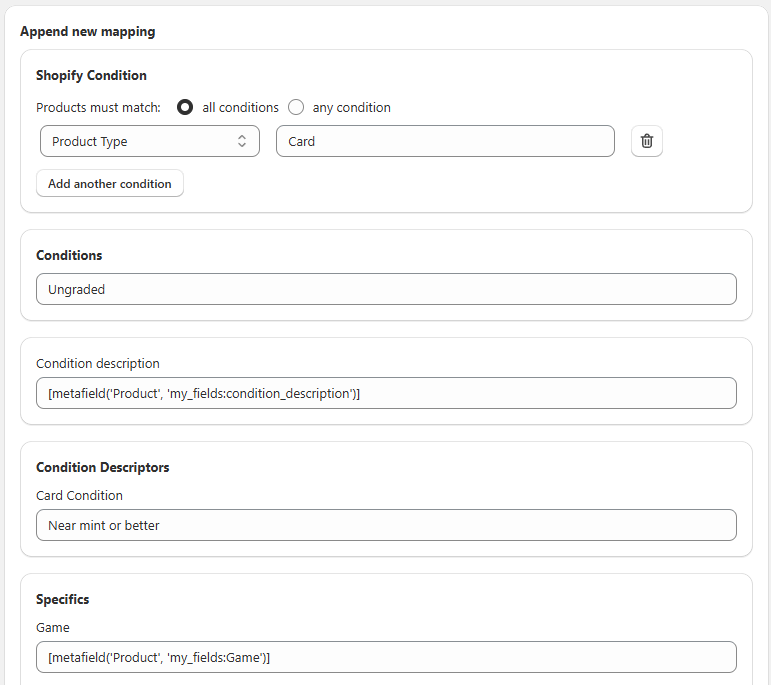
If your cards are Graded, provide details about the grader and the corresponding evaluation:
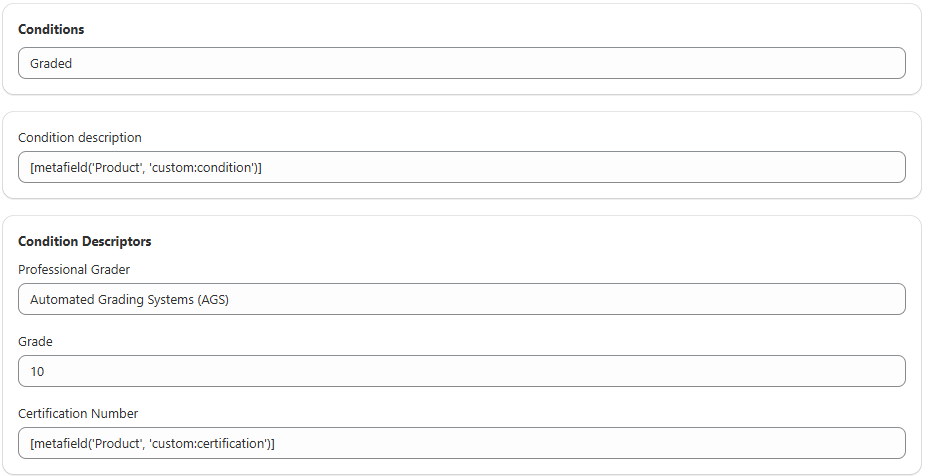
Keep in mind that you can add Shopify Metafields (or Custom fields in other stores) from your shop to the Creation Profile fields. When using Metafields, Salestio dynamically fills in the information depending on the product.
Alternative to Condition Descriptors
It might not be viable to provide condition details for every item. As an alternative, you can use a different category. For example, use the Everything Else > Every Other Thing category. This way, you can skip descriptors and focus on adding more details about the product in the Description section.
Using an alternative category has a drawback of showing lower in search results, because eBay is using the category to index the items.
Related: Learn more about increasing visibility of your marketplace listings
Salestio makes managing multiple stores easier and helps navigate the intricacies of listing eBay products. If you have a running e-commerce store, the app makes it easy to expand to Amazon, eBay, and Etsy. Get Salestio for your platform to start a free 14-day trial.