05 Jun'26





Participating in online marketplaces unlocks a wider audience, but also comes with its own set of challenges for each new platform. If you are managing multiple stores, using external tools can be a great help in navigating the complexities of different marketplaces.
Salestio integrates e-commerce stores with one or more marketplaces. The app brings two main features:
- Product sync (publishing and updating product details, as well as prices and quantities).
- Syncing orders (bringing marketplace orders into the store and sending fulfillment details back to the marketplace).
This article features some of the most common challenges that marketplace sellers can face, and the corresponding Salestio tools that can make your life easier.
Multichannel inventory management
Each sales platform comes with its own inventory, so sellers have to access each control center separately. This can become even more tricky when there is only one physical warehouse. How do you make sure that items are properly stocked everywhere?
Salestio integrates into your e-commerce store inventory and uses it as the primary warehouse. To connect with different marketplaces, you can set up a Selling List and add the products there. Products published through the app are automatically linked and will receive price/quantity updates.
Check out the guides on our blog for connecting existing Amazon / eBay / Etsy listings with store products.

While the item is linked through Salestio, the app will keep scanning the e-commerce store for changes in price or stock, so every marketplace storefront will have up-to-date product statuses.
Prevent overselling
When product is available on multiple platforms, you can take extra measures to prevent overselling. In the Global Profile (main profile for managing price and quantity settings), there are multiple quantity modes that can help:
- “Not more than” mode
In this mode, the quantity is capped at a specified value. For example, if you want only one piece available at any given time, set the QTY Value to 1. This way, the marketplace listing will be always available as 1 until all actual stock is sold out. - “Buffer QTY” mode
Buffering deducts a set value from the store quantity before sending it to the marketplace. If you set the buffer at 5 and send an item with 15 stock, it will be listed with 10 stock instead.
More advanced tips in How to Manage Listing Quantities with Salestio
Refreshing listing information
Preparing for a seasonal sale or updating the branding can take a significant amount of time, especially when managing multiple marketplaces. Salestio manages all stores together, so doing everything through the app can cut down on the prep time.
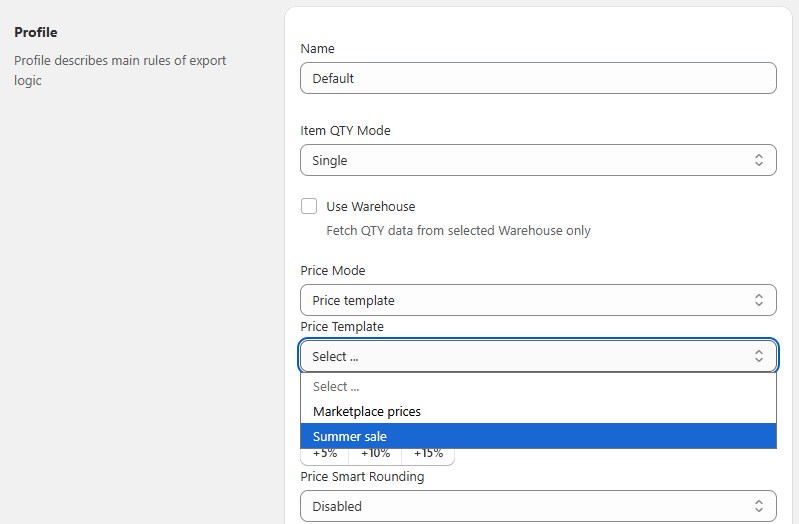
One way to quickly change prices is adjusting the Global Profile in the app. Set your own Price Template with a complicated formula or specify a multiplier, then run a batch update for your Selling Lists.
Learn more: Custom Pricing Rules for Ebay and Amazon Listings
Centralizing order fulfillment
Same as with the inventories, each marketplace platform uses its own system for managing orders. Sellers have to deal with different management platforms and keep in mind the intricacies of each marketplace.
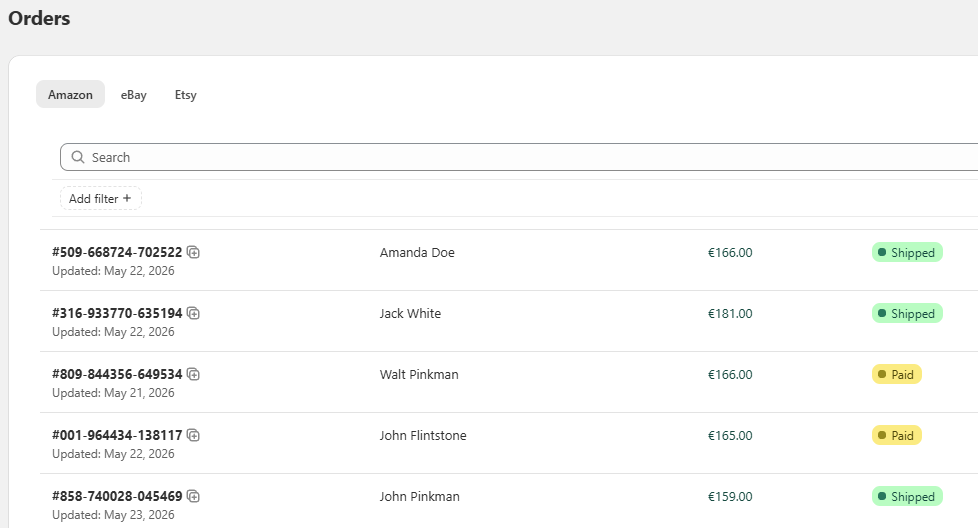
Salestio funnels the orders from all connected marketplaces into your e-commerce platform, so you can introduce them into a unified workflow. This way, a single platform will encompass your Amazon, eBay, and Etsy sales along with the orders from the e-commerce storefront (such as Shopify, BigCommerce, or other).
Fulfilling orders through Shopify (or your platform of choice) will also send the shipping details back to the marketplace.
Full article: Processing Amazon, eBay, and Etsy orders in Salestio
Improving analytics
This point ties in with the previous one, as the analytics tools are mostly confined to one platform. Bringing all orders onto a single platform offers better options for analyzing and keeping track of your customers and sales trends.
After the marketplace orders are brought to your main store backend, you are free to use the built-in platform tools or integrate third-party apps.
Low visibility and algorithm dependence
One of the biggest challenges is scaling up and capturing a wider audience. Mastering all the intricacies of SEO deserves its own bit of attention for any online business.
Salestio offers plenty of tools to optimize the listings in different ways:
- Title composing
When setting up the app for publishing, note the Title field in the Creation Profile. You can keep the default value to use the original store title, add more details, or replace it entirely. Add custom text or custom fields/metafields to achieve the desired results. - Customizable tags
For Etsy, tag customization is available inside of the Creation Profile. Add tags manually or assign metafields instead. Shopify users can enable the option to use the tags defined in the store. - Keyword optimization
To add keywords for Amazon, check the list of item specifics in the mapping of your Creation Profile. Add custom text or use metafields.
More on listing optimization: How to use tags and keywords on marketplaces and in Salestio
Amazon: Valid Tracking Rate stats
Amazon highly values sellers with positive VTR (Valid Tracking Rate). Sellers must ensure that their fulfillment information is correct and complies with Amazon formatting. In Salestio, you can set up a Shipping Mapping to make sure that Seller Central orders come to your store in a desired format and are sent back to Amazon correctly.
Use Case: Configure Shipping Mapping for Amazon in Salestio

eBay: Frequent return requests
Due to the nature of the eBay market (mostly used and refurbished items) it is important to be very descriptive about the item condition and all related details.
The Ultimate Guide to Selling Used Items on Top Marketplaces: eBay, Amazon, and Etsy
Shoppers are eligible for an eBay Money Back Guarantee when the shipment does not match the listing description. Sellers should take care to provide accurate information in description, as well as adding detailed photos.
When dealing with a large inventory, controlling the accuracy of each individual item can be a challenge. Salestio offers extensive tools for making personalized Description Templates. You can use the original store description, add custom CSS styling, include metafields or pictures from the shop, as well as any custom text.
eBay Description Templates: Make Beautiful Descriptions Faster

When using the Description Templates, Salestio can pull information directly from the fields in the store, so you can ensure accurate descriptions even when listing at scale.
To get started, check out the selection of Free eBay Description Templates on our website.
Etsy: strict product origin rules
Etsy is a specialized platform oriented at vintage and handmade-adjacent products. Sellers should consider which of their inventory is eligible for Etsy to maintain good standing on the platform.
See a detailed explanation about what you can sell on Etsy in this article. Etsy asks sellers three questions to make sure that the product fits the platform: when was the item made, who made it, and what kind of item it is. Some examples:
- If you are selling yarn, pins, or other knitting supplies, make sure to indicate that its a “Supply or tool to make things” in the “What is it” field.
- Products made by another company can only be vintage items (20+ years as defined by Etsy). Make sure that the item complies and indicate the correct production period in the “When make it” field.
In Salestio, these settings are set up in the Creation Profile:

Salestio can receive answers to these questions from metafields in your store. This way, the decision process can be automated, and items that don’t fit Etsy will be skipped during publishing.
Shopify Metafields in Salestio: Overview
If you want to start selling on Amazon, eBay, or Etsy, Salestio can help by automating the process. Don’t have the app yet? Grab a Free 30-day Trial here.
For any questions and comments regarding Salestio, feel free to message support@salest.io.